
Advanced Features
PullPro includes several advanced features that give you greater control over how pull requests are managed within Slack. These features are designed to provide flexibility for teams with specific workflows, including moving PRs between channels and holding one back from review until it merges.
Move PRs Between Channels
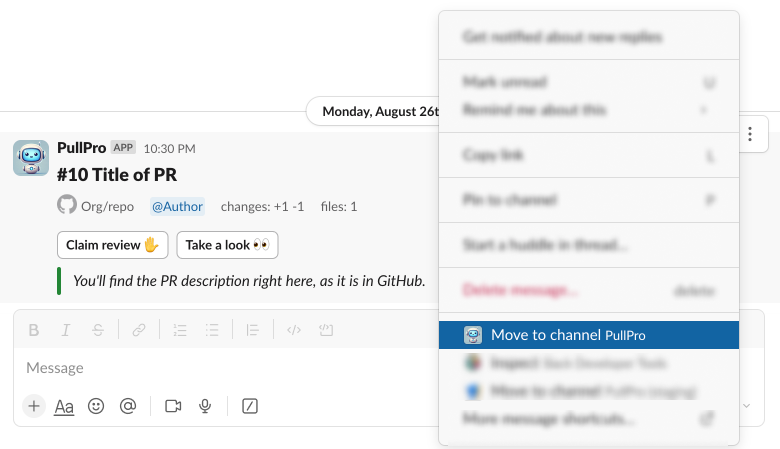
Sometimes a pull request may be posted in the wrong Slack channel, or you may decide to move it based on team discussions. PullPro allows you to easily move a PR from one Slack channel to another using a simple Slack message shortcut.
How to Move PRs Between Channels
- Locate the PR post in the current Slack channel.
- Click the message options button (the three dots).
- Select the Move to another channel option.
- Choose the destination Slack channel from the dropdown list.
Once the PR is moved, all future notifications and updates for that PR will be sent to the new channel. Any reminders for the PR in the previous channel will be marked as resolved.
Skip Review Label
Some pull requests do not need the team's attention before they merge — a version bump, a generated
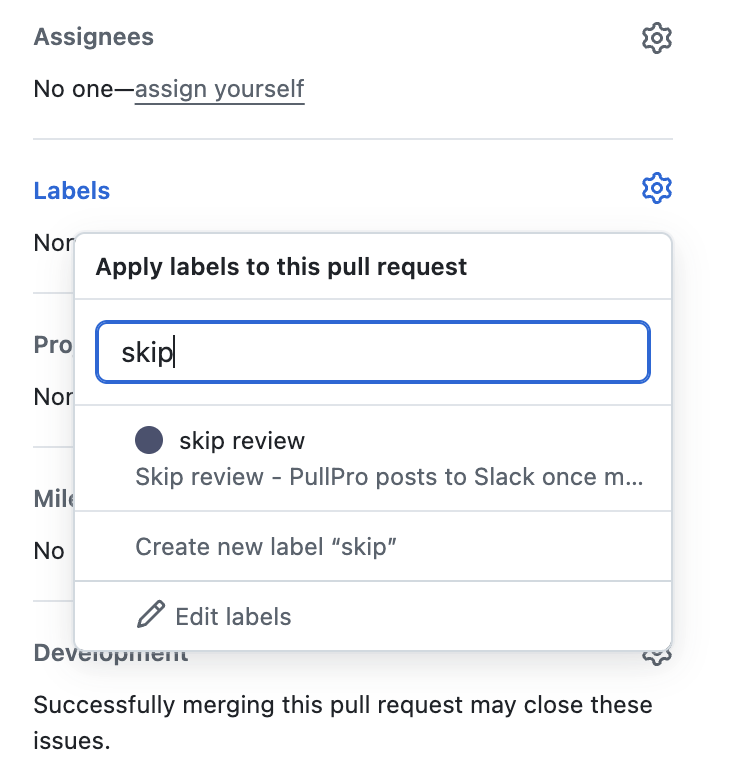
file, a small internal change. Adding the skip review GitHub label holds one back from
the channel while it is open.
Steps
- On the GitHub PR page, add the
skip reviewlabel to your pull request. - Mark the PR as ready for review.
While the pull request is open it is not posted to the channel and it sends no review reminders. Once it merges, PullPro posts it, so the work still shows up and still counts towards your metrics.
PullPro adds this label to every linked repository itself, so it is there to pick from the moment a repository is connected.